


Saves Wear and Tear On Your Budget
Get free toll stickers for every vehicle in your business and save on tolls.
Get Started
Trusted by Millions: More Savings. Less Stress.
Easily pay, track, and manage tolls for every vehicle in your business with one account and savings you can count on. Discover how E-PASS can take the hassle out of toll management for your business.
*E-PASS toll rates are half off Pay By Plate rates.
Ready to start saving?
Sign up online or contact one of our dedicated Business Account Customer Service Representatives today.
Email: BizAcct@cfxway.com
Call: 407-690-5400 (Monday-Friday: 8AM – 5PM)
Pick Your Toll Passes
Choose the toll passes that best fit your business needs to get started.
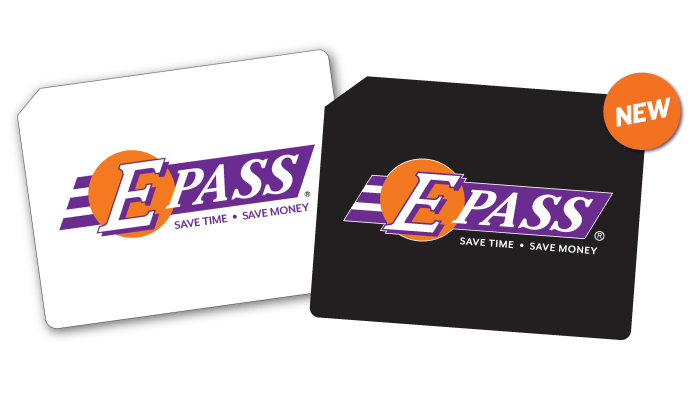 E-PASS Sticker
Our free sticker works in FL, GA & NC and sticks permanently to your windshield.
Free
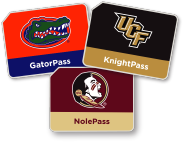 CollegePass Sticker
Show your team spirit with fun stickers that work in FL, GA & NC and stick to your windshield.
$9.95 + Tax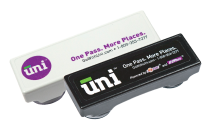 Uni
Uni
Travel in 19 states with one portable transponder. Available in black or white.
$14.95 + Tax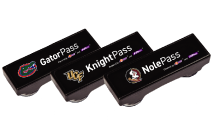 CollegePass Uni
Show your team spirit with the new black college-branded UNI — works in 19 states.
Available on Amazon| Benefit | E-PASS Sticker | CollegePass Sticker | Uni | CollegePass Uni |
|---|---|---|---|---|
| Works in FL, GA, NC | ||||
| Pay the lowest toll rate in FL | ||||
| Eligible for volume toll discounts | ||||
| Parking at Orlando International Airport (including Brightline) & Port Canaveral Cruise Terminal 3 | ||||
| Permanent windshield install | ||||
| Team‑branded | ||||
| Works in 19 U.S. states | ||||
| Move between vehicles | ||||
| Blends into your windshield |
Sign Up Details
To get started, you'll need:
- Business name and EIN #
- Make, model, year, color, number of axles and license plate number for each vehicle
- Preferred transponder type for each vehicle
- Credit/Debit Card or Bank Account
- Initial $10 deposit to fund pre-paid toll account
If you have less than 10 vehicles, get started online.
If you have more than 10 vehicles, please contact customer service to complete account set up via email at BizAcct@cfxway.com or call 407-690-5400.

“I recommend using E-PASS. Thanks for everything!”
Frequently Asked Questions
What is needed to open an E-PASS Business Account?
To open an E-PASS Business Account, you will need the following:
- Business name, Employer Identification Number (EIN), and contact information
- A list of vehicles to be added, including license plate number and state, make, model, year, color, and number of axles
- Preferred transponder type for each vehicle
- A form of payment, including a $10 toll deposit per transponder that will be applied to future tolls.
How do I open an E-PASS Business Account?
You can open an E-PASS Business Account in one of the following ways:
- Online: Register your business and add vehicles.
- By phone: Call Customer Service support at 407-690-5400 (Monday through Friday, 8 AM to 5 PM).
- By email: Email BizAcct@cfxway.com for assistance.
- By phone: Call Customer Service support at 407-690-5400 (Monday through Friday, 8 AM to 5 PM).
- By email: Email BizAcct@cfxway.com for assistance.
How many vehicles can I add to an E-PASS Business Account?
Businesses of any size can open an E-PASS Business Account and register online.
- You can add up to 10 vehicles at a time through the online registration.
- If you have more than 10 vehicles, you can continue adding them in batches of up to 10 until all vehicles are registered.
All E-PASS Business Account customers receive access to the same benefits and customer support services.
If you need assistance setting up an E-PASS Business Account, you can contact our Customer Service support team for help.
Will I incur monthly or annual fees with an E-PASS Business Account?
No. E-PASS does not charge monthly or annual account fees for business or personal accounts. You are only charged for the tolls incurred by your registered vehicles.
Where does E-PASS work?
The E-PASS Sticker and CollegePass transponders can be used on all toll roads and most toll bridges in Florida, as well as in Georgia and North Carolina. In Florida, look for the E-PASS, SunPass, or LeeWay logo when entering a toll road.
E-PASS Uni works in 19 states—from Florida to Maine and west to Minnesota—and is fully compatible with E-PASS, SunPass, LeeWay, PeachPass, NC QuickPass, E-ZPass, RiverLink, and I-PASS toll systems.
How do I manage my E-PASS Business Account and vehicles?
Managing your E-PASS Business Account is simple and convenient. You have 24/7 online access to view transactions, vehicle details, and account history, with monthly statements emailed to you for easy tracking.
You can add new vehicles or update existing information at any time through your online account. Uni transponders can be moved between vehicles by updating the vehicle details, while E-PASS stickers are not transferable and must remain on the original windshield. If you move a Uni transponder between vehicles, be sure to update your account each time so it is correctly linked to the vehicle in use.
You can also add funds online (select Reload E-PASS, by phone, or by mail, or set up auto-replenishment with a credit or debit card so your account is always ready.

Ready to hit the road?
Get Started with an E-PASS Business Account Today
Start saving on tolls and drive smarter.
Open Your Account